Comentario 3.18.0 Loughguile is released.
Comentario is a fast and powerful free comment server for web pages, written in Go.

You can follow relevant news in the Comentario blog or via RSS .
Breaking change
There’s one (minor) breaking change in this version: the xsrfSecret key is no longer recognised in the secrets file. It was functionally replaced by serverSigningKey, which is now used to generate signing secrets, whereas XSRF protection isn’t using tokens anymore.
If you omit this value (which you most likely did), Comentario will generate a random signing key on each restart.
What’s new
Accessibility fixes
There’s a massive improvement in the accessibility of the embedded comments (#221). Although not very visible for those without an impairment, the internal structure of the controls has been revised en overhauled: refer to the linked issue for details.
Spoilers in comments
Comment authors can now hide parts of their text behind a spoiler (#112), using the >! markdown prefix:
Did you know…
>! Snape kills Dumbledore
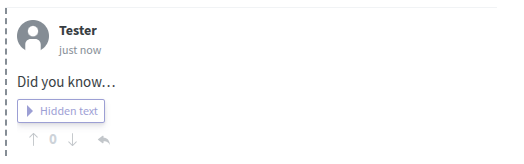
The hidden text is only revealed after the reader clicks on the corresponding button. There’s a new toolbar button for inserting spoilers, and the whole feature can be switched off with the domain.defaults.markdown.spoilers.enabled dynamic configuration parameter.
Sign in with Apple
Comentario now supports Sign in with Apple as a first-class identity provider (#231, #5); a change contributed by Tim Oliver.
It takes a bit of preparation on the Apple side: you’ll need a paid Apple Developer Program membership, a Services ID, your Team ID, and a private key. Apple also insists on an HTTPS callback, so the instance has to be served over TLS (which is a sane thing to do anyway).
Once the secrets are configured and the server is restarted, Apple authentication can be enabled per domain, just like any other federated provider, and commenters get an Apple button in the Login dialog.
Reconfiguring the widget on the fly
The embedded comment widget now reacts to attribute changes on the <comentario-comments> element while it’s live (#140), instead of only reading them once during initialisation.
This mainly helps single-page applications: switching the page ID, the language, or the number of nesting levels no longer requires tearing the widget down and recreating it.
Top domains in Dashboard
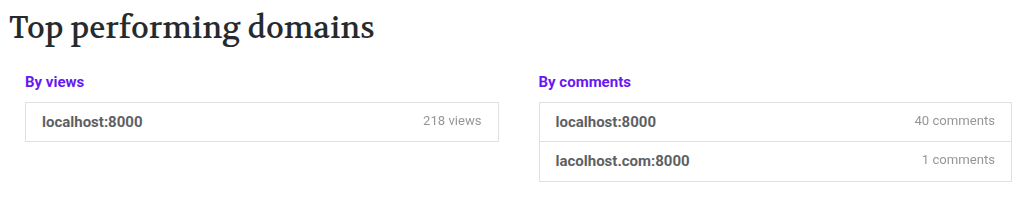
The Dashboard gained a Top performing domains section (#167), giving instance owners a quick overview of where the activity actually is.
Domain users
Domain users can now be deleted (#165), which was previously only possible for the user as a whole.
Secrets from the environment
Until now the secrets, such as database credentials, SMTP passwords, identity provider keys, had all to be put in a single YAML file. As of this version they can also come from environment variables prefixed with COMENTARIO_, for example COMENTARIO_POSTGRES_USERNAME (#220).
Every such variable also has a _FILE counterpart (COMENTARIO_POSTGRES_USERNAME_FILE) pointing at a file that holds the value, which dovetails more nicely with how Kubernetes handles secrets. Environment variables take precedence over the secrets file.
Other changes
- New Require a name for unregistered commenters dynamic config parameter (#232)
- Display comment stats when page view gathering is disabled; freeze pageview counters
- Embed: fix comment draft not cleaned up after submission (#223)
- Backend: fix new comment email unsubscribe
- Backend: swap out
gorilla/csrfforhttp.CrossOriginProtection(CVE-2025-47909) systemd: restart Comentario on crash (#189) by @scottlaird- Admin UI: migrate to Angular 22 and the new build system, migrate to signal forms
- I18n: add Polish translation (pl) by @MrBoombastic
- I18n: fix Portuguese messages by cosvaldo
- Code: migrate unit tests from Karma to Vitest, add unit tests
- Toolchain/dependency updates (Go 1.26.5, Ubuntu 26.04, Angular 22)
Live Demo
You can see the new version, as well as its Administrative UI (login with email admin@admin and password admin), on the demo website:
Comments Live Demo Administrative UI Demo
Installation
If you’re interested in trying out Comentario, you can start with these documentation pages:
 — world’s fastest URL shortener
Comments